

ENERGY STAR | Home
Engineered for Sustainability
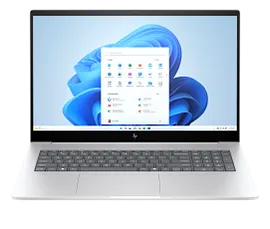
HP Envy Laptop 17-da0047nr 17.3", Touch screen, Windows 11 Home, Intel® Core™ Ultra 7, 16GB RAM, 512GB SSD, FHD, Glacier silver
Screen Size17.3"ColorGlacier silver
- Windows 11 Home
- Intel® Core™ Ultra 7 processor
- Intel® Arc™ Graphics
- 16 GB memory; 512 GB SSD storage
- 17.3" diagonal FHD touch displaySee all Specs
Can't find what you are looking for?
DiscontinuedThis PC has been discontinued.
Engineered for Sustainability
Product # 9V8M3UA#ABA
HP Envy Laptop 17-da0047nr 17.3", Touch screen, Windows 11 Home, Intel® Core™ Ultra 7, 16GB RAM, 512GB SSD, FHD, Glacier silver
$0.00
Power your passion with the HP Envy 17" Laptop PC, boasting integrated AI technology and the latest Intel® Processor[1] for swift multitasking and extended battery life. Work more flexibly and efficiently with the 17" touchscreen design. Made with recycled materials and with plastic-free packaging, this laptop PC is good for you and the planet.
Elevate your productivity with built-in AI
Conquer your workday with built-in AI processing power for optimized battery life and seamless multitasking.
The right tools for every task
Seamlessly connect your smartphone to transfer files and enjoy crystal-clear connections with the 5MP camera.
Power and mobility in one package
Conquer your day with ample storage and memory for seamless app performance on an expansive 17" touchscreen.
Built with our shared future in mind
Copilot in Windows 11 - Get answers, inspiration, and summaries
Find the relevant information and ideas you need to power your own ingenuity. Copilot in Windows 11 can deliver answers that are more relevant to you**.
Recommended Accessories
Features
Get a fresh perspective
From a rejuvenated Start menu, to new ways to connect to your favorite people, news, games, and content—Windows 11 is the place to think, express, and create in a natural way.[5]
Intel® Core™ Ultra
Experience powerful and responsive performance to help your productivity soar. Seamlessly edit, share, and enjoy fantastic 4K entertainment with lightning-fast speed.[6]
FHD touchscreen
Intuitive touchscreen technology lets you control your PC right from the screen. And the vibrant 1920 x 1080 resolution delivers 2 million pixels for crystal-clear visuals.[7]
100% sRGB
Showcase your creations in all their colors on the 100% sRGB display for maximum color broadness and accuracy.
Flicker-free
Using DC Dimming technology that controls brightness by adjusting direct current rather than cycling the backlight, we can eliminate screen flickering for more comfortable viewing.[8]
Try PC Game Pass for free with your new HP device
Play hundreds of high-quality PC games with your new HP device and 3 free months of PC Game Pass – including EA play. With new games added all the time, there’s always something new to play.[9]
16:9 aspect ratio
A 16:9 aspect ratio lets you see more of your content with less scrolling.[10]
Copilot in Windows with Copilot key
Copilot in Windows gives you intelligent answers. Access with just the touch of the Copilot key.[11]
Recycled aluminum
Because little things make a big difference, this laptop design includes sustainable materials like recycled aluminum.[12]
EPEAT® Gold with Climate+
With EPEAT® Gold with Climate+, you're choosing a movement towards responsibility and climate action.[13]
ENERGY STAR® certified
Save energy and money with ENERGY STAR®, certified by the EPA so you will use less energy and save money where it counts most.[14]
HP Fast Charge
When your laptop is low on power, no one has time to wait hours to recharge. Power down your device and go from 0 to 50% charge in approximately 30 minutes.[15]
Technical Specs
Reviews and Q&A
HP Envy Laptop 17-da0047nr 17.3", Touch screen, Windows 11 Home, Intel® Core™ Ultra 7, 16GB RAM, 512GB SSD, FHD, Glacier silver is rated
out of
5 by
50.
Rated 4 out of
5
by
Kat Black from
New HP Envy
It's overwhelming! My old computer was a 2014. So many options for doing everything. Notes will pop up on the bottom right side. I don't have time to read them or click on them to see what it's about.
Oh My...so fast. Hate the thought of cluttering it up, slowing it down. Can't make full evaluation, still new.
Date published: 2025-08-28
Rated 4 out of
5
by
Linda A.. from
my HPENVY 173 INCH
I truly love my Envy. It has been amazing so far. The only thing I wished it had was Face ID for log in instead of a pin. Otherwise I am very happy! I am NOT an HP employee. I couldn't get the yes to make a no!
Date published: 2025-08-11
Rated 4 out of
5
by
Cyanfan from
Envy Laptop Computer
Best laptop computer ever!!1
Date published: 2025-08-02
Rated 5 out of
5
by
Anonymous from
An old guy learns new tricks
This is my first laptop in over 20 years. I have used a tower during that time. We have a unique situation as we live on an island off the west coast of Florida and we have to evacuate due to hurricanes several times each year. The keyboard and screen are equal in comfort to my old keyboard and monitor. I can now quickly grab this laptop as we leave.
I am almost 80 and often rely on my grandchildren for tech support. But I was able to easily set up my new laptop and transfer software and files.
Date published: 2025-06-05
Rated 1 out of
5
by
David DT from
Came with bogus serial number and touchpad which could not be configured
I would avoid HP at all costs. I got several versions of this laptop, older with an Intel Core i7 as well as this newer model with the Ulrta 7. I was unable to get ANY tech support due to HP not recognizing the serial number as valid.
I originally tried to get support because it is impossible to turn of the touchpad's "Tap" feature. When I am typing, my thumb occasionally hits the touchpad causing the cursor to move to wherever the mouse pointer is. There is an option to turn that feature off in Settings, but IT DOES NOT WORK! This happened on 4 different HP Envy 17" laptops.
I was unable to get tech support because I was asked for the serial number, which was invalid, even though the computer came directly from HP. I emailed several times and was told to expect a call from tech support which I never received. Finally, I spent over 3 hours on the phone, starting with customer service to address the issues The CS rep Kylie told me it would take a week to get the serial number updated. He also said that my warranty had 318 days left on it. This was a computer that I had received 3 days before. I asked him to correct it and he demanded that I email an "invoice," which I had never received, to document the purchase date. It was purchased from HP. THEY KNOW THE PURCHASE DATE! Finally, he accepted a screen shot of the order confirmation email and said the warranty would be updated within a week.
I then spent 90 minutes on the phone with a tech support agent who knew less than I do about troubleshooting, and eventually issued an RMA to return the computer.
I fully expect the next computer to have the same issues, and I will have to decide whether to live with them or buy a reliable brand.
Date published: 2025-04-06
Rated 2 out of
5
by
D Gal from
I replaced my older HP Envy Laptop purchased 9 1/2 years ago with this recent version. No comparison
The HP Envy Laptop 17, Windows 11 Home, 17.3" reaction time online is good. I agree with some of the reviews the power button is poorly placed, too close to the delete button. I have had to call three techs(incl. 2 HP techs) to solve the problem of losing wi-fi connection and having to shut down and restart the laptop each time to regain connection. I have only had the HP Envy two months.
Date published: 2025-02-17
Rated 5 out of
5
by
Bigdog9519 from
Great Laptop
Very nice computer that is exactly what I was wanting, and the price was reasonable.
Date published: 2025-02-05
Rated 4 out of
5
by
Laptop reviewed from
Most problems went away with this purchase
My old HP laptop needed a new battery, was very slow and was falling apart, literally! Norton says it has broken registries, but won't fix that problem. This new one is better in all respects except Norton says it has broken registries. I do like the feature that recognizes my face to allow me in!
Date published: 2025-01-28
Can I use 3 external monitors with this laptop in combination with the HP USB-C G5 Essential Dock?
Hello. Thanks for your question. You can use the HP USB-C G5 Essential Dock with the HP Envy Laptop 17-da0047nr. The dock has 2 DisplayPort 1.4 ports and 1 HDMI 2.0 port for three monitors.
Date published: 2024-06-23
what battery is installed in HP envy 17.3 ?
Thank you for your question! The HP Envy Laptop 17-da0047nr has a li-ion polymer battery.
Date published: 2024-10-01
Which pen is compatible with hp envy 17 cw1023cl touchscreen?
Thank you for your question! The HP Envy Laptop 17 is not tablet-mode compatible and will not be compatible with Active Stylus pens. This will still be compatible with passive stylus pens. Like the active stylus, you can tap or write directly on a screen with a passive stylus (also called a capacitive stylus). But unlike an active stylus, the passive/capacitive stylus doesn't have touch sensitivity or electronic components. There's no communication between the stylus and the device.
Date published: 2025-04-08
Does this touch screen support a stylus/pen such as the HP slim rechargeable pen?
Hello. Thanks for your question. You can use a passive stylus with this HP Envy Laptop 17-da0047nr.
Date published: 2024-09-22
Can you add more ram and storage?
Thank you for your question! The HP Envy Laptop 17-da0047nr does not feature an expansion slot for a second SSD, an external is recommended. The laptop is compatible with up to 32 GB DDR5-5600 MHz RAM. As the RAM is not easily accessible, HP recommends only IT professionals or self-maintainers perform upgrades.
Date published: 2024-10-14
Are there currently any touch screen laptops that you can use a pen on?
Hello. Thanks for your question. We recommend looking at the HP Envy x360, HP Spectre x360 or HP OmniBook Flip models.
Date published: 2025-04-08
Can I get this computer without the software?
Thank you for your question! The HP Envy Laptop 17-da0047nr is preconfigured and ships as specified.
Date published: 2024-09-26
is it detrimental to never use the touch screen?
Thank you for your question! No, it is not detrimental to never use the touch screen.
Date published: 2024-09-09
Similar Products

1/7
HP Envy Laptop 17-da0097nr 17.3", Touch screen, Windows 11 Home, Intel® Core™ Ultra 7, 32GB RAM, 1TB SSD, NVIDIA® GeForce RTX™ 3050, FHD, Glacier silver
This PC has been discontinued.Windows 11 HomeIntel® Core™ Ultra 7 processorNVIDIA® GeForce RTX™ 3050 Laptop GPU (4 GB GDDR6 dedicated)32 GB memory; 1 TB SSD storage17.3" diagonal FHD touch display
9V8M4UA#ABA
ENERGY STAR | Home
Engineered for Sustainability
Return and exchange information
Most items may be returned within 30 days of delivery. A restocking fee of up to 15% of the purchase price may be deducted from your refund for returned items, except where prohibited by law. No restocking fee applies to defective or incorrect items. A restocking fee is not applicable for printers, ink, toner, paper, care packs, software and services. For details, please visit: https://www.hp.com/us-en/shop/cv/returnsandexchanges.


